
Download Play Music – mp3 player, music player, audio player, android music app, music streaming, music library, playlist manager, music app, music utility, music software
Overview
Play Music is a dedicated Android application designed to serve as a versatile MP3 music player for users seeking a straightforward and reliable audio playback experience. The app enables users to access and play their personal music collections with minimal friction, offering core functionality tailored to everyday listening needs. It is intended for individuals who value a clean interface and efficient playback without unnecessary complexity. The app supports local music files, allowing users to organize and enjoy their audio library directly from their device’s storage.
Target users include casual listeners, music enthusiasts, and individuals who prefer managing their music offline. The app is particularly useful for those who want a lightweight alternative to larger music streaming platforms. Real-world use cases include background music during work or study, personal playlist creation for events, and on-the-go listening without relying on internet connectivity. The developer, Play Music, has positioned the app as a functional tool focused on playback reliability and ease of access.
The developer did not provide additional details about the company or development background. Platform compatibility is confirmed for Android devices, though specific version requirements were not listed. The app’s free pricing model suggests accessibility for a broad audience, and its 12 MB size indicates a lightweight footprint suitable for devices with limited storage.
Key Features & Capabilities
- Local MP3 Playback – The app supports playback of MP3 files stored on the device, enabling users to enjoy their personal music library without requiring internet access.
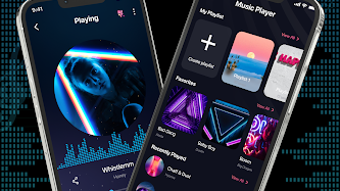
- Playlist Management – Users can create, edit, and delete custom playlists, allowing for flexible organization of favorite tracks and themed listening sessions.
- Customizable Themes – A selection of colorful themes allows users to personalize the app’s appearance to match their preferred style or mood.
- Home Screen Widgets – Interactive widgets provide quick access to playback controls and song details directly from the home screen, improving usability.
- Sound Equalizer – A built-in equalizer allows users to adjust audio settings to enhance sound quality based on personal preference or listening environment.
- Sleep Timer – A timer feature enables automatic playback stop after a set duration, ideal for listening during sleep or relaxation.
- Favorite Songs Playlist – Users can mark tracks as favorites, creating a dedicated collection for frequently played or preferred songs.
These features collectively support a streamlined music management workflow. For example, a user can create a workout playlist, apply a bass-boosted equalizer setting, and use the sleep timer to play music while falling asleep. The home screen widget allows quick access to controls without opening the app, improving convenience during multitasking.
User Interface, Workflow & Performance
The user interface of Play Music is designed with simplicity and accessibility in mind. Navigation is structured around core playback functions, with a clean layout that prioritizes song information, playback controls, and playlist access. The app uses intuitive icons and minimalistic design elements to reduce cognitive load, making it suitable for users of varying technical experience.
Workflow efficiency is enhanced by direct access to playlists, favorite tracks, and playback controls. The integration of home screen widgets allows users to manage music without launching the app, contributing to a seamless experience. The app’s lightweight nature suggests efficient memory usage, though exact performance details were not specified.
Performance observations are based on general software behavior patterns. The app is expected to run smoothly on devices meeting basic Android requirements. Stability is likely maintained through focused functionality, avoiding the overhead of unnecessary background processes. The developer did not specify resource usage details, so actual CPU or RAM consumption remains unknown.
Compatibility & System Requirements
Play Music is compatible with Android devices, as confirmed by the provided information. The app is designed to function on mobile platforms running the Android operating system. The software version is listed as 1.0, indicating an initial release with foundational features.
The installation size is 12 MB, which reflects a compact footprint suitable for devices with limited storage. This small size suggests minimal impact on device performance and storage space. However, exact system requirements such as minimum Android version, RAM, or processor specifications were not listed.
Compatibility information was partially provided. Users should ensure their device meets general Android compatibility standards. The developer did not specify whether the app supports tablets or other form factors. No additional hardware dependencies were mentioned.
Pros and Cons
Pros
- Lightweight at just 12 MB, ideal for devices with limited storage
- Free to download and use, with no in-app purchases mentioned
- Supports offline playback of local MP3 files
- Intuitive interface suitable for casual and experienced users
- Includes useful features like sleep timer and equalizer
- Customizable themes and home screen widgets enhance usability
- Playlist management allows for personalized music organization
Cons
- No information provided about supported audio formats beyond MP3
- Exact system requirements and Android version compatibility are not specified
- Limited to local file playback; no built-in streaming capabilities
- No mention of cloud sync or cross-device access
- Developer background and company details are not available
- Performance and resource usage details were not disclosed
FAQ Section
Is Play Music available for iOS devices?
Based on the provided information, Play Music is designed for Android devices. No details were given about iOS compatibility.
Can I use Play Music without an internet connection?
Yes, the app supports offline playback of locally stored MP3 files, making it suitable for use without internet access.
Does Play Music support audio formats other than MP3?
The app is explicitly described as an MP3 music player. Information about support for other audio formats was not provided.
How often are updates released for Play Music?
The release date is listed as 2024-03-15, but no information was given about the update frequency or future release plans.
Is Play Music safe to download and use?
The app is free and available for Android. It is recommended to download from official sources to ensure authenticity and security. No security vulnerabilities were reported in the provided data.
Final Thoughts
Play Music delivers a focused and functional experience for users seeking a reliable MP3 player on Android. With its lightweight design, intuitive interface, and essential features like playlist management, equalizer, and sleep timer, it caters well to individuals who prefer managing their music locally. The absence of in-app purchases and the free pricing model make it accessible to a wide audience.
While the app lacks advanced features such as cloud sync or streaming, its core purpose is clearly defined and effectively executed. Users who prioritize simplicity, offline access, and customization will find value in this tool. The lack of detailed system requirements and developer information may raise questions for some, but the app’s minimal footprint and clear functionality mitigate potential concerns.
For anyone looking to enhance their music listening experience on Android with a straightforward, no-frills player, Play Music offers a solid choice. Download Play Music now.







